Solid Starts: Baby Food App
Solid StartsParenting
4.8748.00 Reviews
- Version
- 6.10.0
- Installs
- 1.00M
- Age Rating
- Everyone
Screenshots

Our Review of Solid Starts: Baby Food App
 Analysis by Appyee
When I’m deciding what to offer a baby who is just starting solids, the hardest part is often not finding a recipe; it’s checking the details for a particular food while juggling a real meal. Solid Starts: Baby Food App is built around that practical question. Its food reference and preparation guidance make it useful at the moment a parent is choosing, cutting, or serving something unfamiliar, rather than only when planning a menu in advance.
A kitchen-table tool for the whole household
Imagine one caregiver is making lunch while another is watching the baby. A food that seems simple to serve can prompt questions about its texture, shape, or preparation. I’d use the database to look up that specific ingredient, then share the guidance verbally with whoever is helping. That is a more dependable routine than asking everyone to remember advice from a different article or a quick social post.
It can also help when grandparents or a babysitter are involved. I would not assume that installing the app automatically gives everyone the same history or account access; the sensible approach is to agree on who checks the guidance and how important notes are passed along. If a caregiver needs to use the app on a shared phone or tablet, decide whose account is active and avoid leaving personal information open for someone else to browse.
Make the lookup fit the moment
The database is most useful when you search for a food you actually have, rather than trying to learn the entire catalog at once. Before serving something new, I’d check its entry, review the suggested preparation for the baby’s stage, and then use that information to guide the meal. This small sequence is easier to repeat than saving a pile of general articles and hoping to find the right one later.
A practical tip is to keep the app’s role narrow: it can help answer food and serving questions, while your child’s clinician remains the right person for individual medical concerns. If your baby has a known allergy, feeding difficulty, or a health condition affecting eating, general app guidance should not replace advice tailored to that child. That boundary makes the resource more useful, not less.
What to expect from the free app
Solid Starts is a free parenting app from Solid Starts, with optional in-app purchases ranging from around two dollars to about one hundred dollars per item. That makes it possible to begin using the core app without paying, but I would check what a particular paid item includes before buying it. The free starting point is appealing if you mainly want to consult food entries; anyone looking for a specific paid planning resource should confirm that it matches their needs first.
The app is rated for everyone and is available in version 4.1.0, with Android 7.0 as the minimum operating-system requirement. Its 4.8 average across around 20,000 ratings and more than one million installs suggest that many families have found it useful, though popularity alone cannot tell you whether its approach suits your household. It was released in May 2021, so I’d still treat each entry as guidance to review thoughtfully rather than a substitute for current, individualized professional care.
Where it fits among parenting resources
Compared with a general parenting app, a cookbook, or searching the web each time, Solid Starts is more focused on the food in front of you and how to prepare it for a baby. That focus is its strength: you can look up an ingredient instead of sorting through broad advice. A cookbook may be better when you want complete family recipes, while a clinician or dietitian is the better choice for personal medical guidance. The app is a companion to those resources, not a replacement for either.
It is also not the best fit for every caregiver. If you prefer a simple, fixed meal schedule and do not want to browse individual foods, a straightforward meal planner may feel easier. If you already have a trusted system for recording new foods and reactions, maintaining another log could feel like extra work. I’d start with the reference material first, then decide whether the planning and tracking tools genuinely reduce friction for you.
For a busy evening, I’d use it before the baby is hungry: check the food, choose an age-appropriate preparation, and pass the key point to the other adult who may help with serving. Looking things up in advance avoids turning a meal into a last-minute research session. The trade-off is that an app cannot make the decision for you; a caregiver still has to interpret the guidance and adapt it to the child.
If you are wondering whether you need to pay to get started, the app is free to download, with optional purchases rather than a required upfront price. If you are wondering whether it works for a very young baby or an older child, its purpose is introducing foods to babies, so its strongest use is during the early solids journey; it is not a general family meal organizer. And if you need certainty about an individual reaction or a medical feeding question, contact a qualified professional rather than relying on a general entry.
Getting Started with Solid Starts
Right from the get-go, the app is super user-friendly. You’ll find it easy to download and set up, whether you're on Android or iOS. The first thing I noticed was the clean design, which makes navigation a breeze. There’s no clutter — just straightforward options that guide you to the information you need.
Explore the World of Baby Food
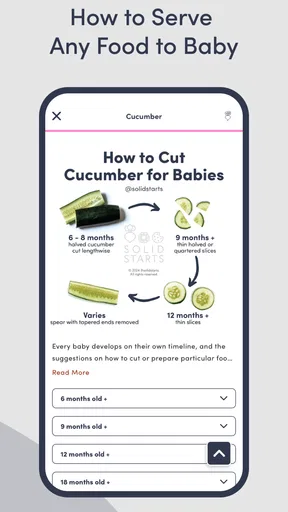
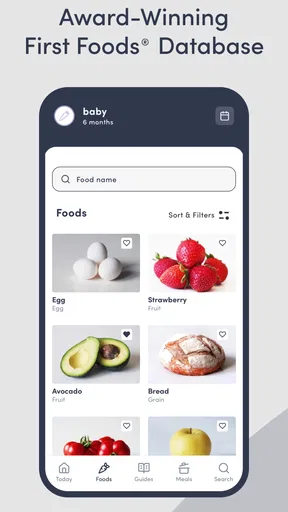
Once you dive into the app, you’re met with a comprehensive database of foods. I was impressed by the extensive list. You can search for just about any food you’re curious about, and the app provides details on how to prepare it safely for your baby. Plus, it covers various preparation methods depending on your baby’s age.
Each food entry includes allergen information, nutritional value, and tips on how to serve it. This is where Solid Starts really shines. The guidance is thorough, helping you feel confident in the choices you’re making for your little one.
Personalized Meal Plans
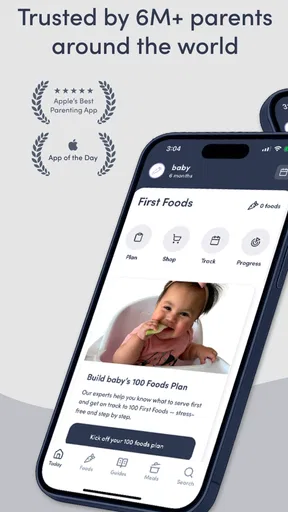
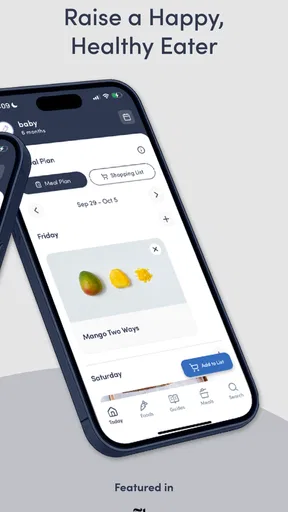
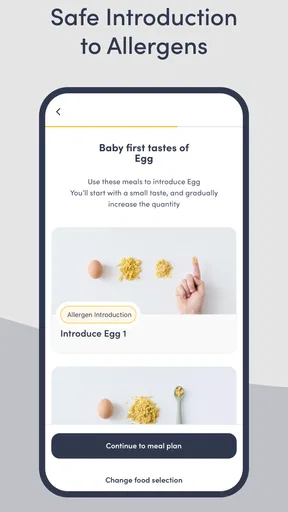
One of the standout features is the ability to create personalized meal plans. You can tailor them to suit your baby’s age, dietary needs, and preferences. I found this feature particularly handy for planning a week’s worth of meals without the hassle of last-minute decisions.
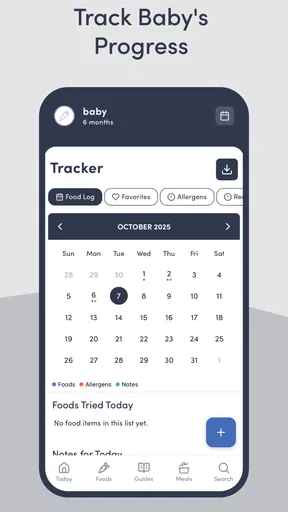
The app also offers a section for tracking your baby’s food journey. You can log the foods your baby has tried and note any reactions. This tracking feature is a game-changer for staying organized, especially when you’re introducing new foods regularly.
Expert Advice at Your Fingertips
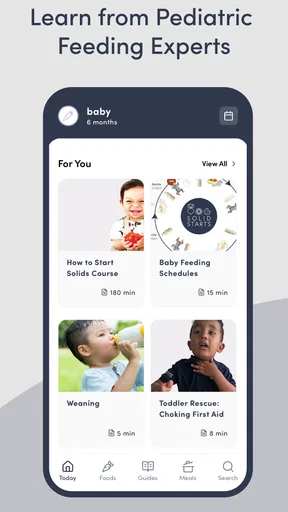
What really sets the Solid Starts: Baby Food App apart is the wealth of expert advice. The app includes articles and tips from pediatricians and nutritionists. These are perfect for when you’re unsure about certain foods or need reassurance about your baby’s eating habits.
Moreover, the app updates regularly with new content, so you’re always learning something fresh. I found the articles easy to read and loaded with practical advice that you can apply immediately.
Community Support
Being a parent can sometimes feel isolating, especially when you’re tackling something as daunting as starting solids. That’s why the community aspect of the app is such a relief. There’s a space where you can connect with other parents, share experiences, and ask questions.
This sense of community is invaluable. It’s reassuring to know that you’re not alone and that others are navigating the same challenges. Plus, it’s a great way to get new meal ideas and tips from parents who are in the same boat.
Final Thoughts
All in all, the Solid Starts: Baby Food App is a must-have for any parent embarking on the journey of introducing solids. Its user-friendly interface, comprehensive food database, and expert advice make it an incredibly supportive tool.
Whether you’re a first-time parent or a seasoned pro, this app will help take the stress out of feeding your baby and transform mealtime into an enjoyable experience. So, if you’re ready to dive into the world of baby foods with confidence, give Solid Starts a try—it might just become your go-to resource.
Privacy and Permissions
See what permissions an app requests and how it handles your data.
- Phone
- read phone status and identity
- Photos/Media/Files
- read the contents of your USB storage, modify or delete the contents of your USB storage
- Storage
- read the contents of your USB storage, modify or delete the contents of your USB storage
- Camera
- take pictures and videos
- Microphone
- record audio
- Wi-Fi connection information
- view Wi-Fi connections
- Device ID & call information
- read phone status and identity
- Other
- view network connections, full network access, run at startup, draw over other apps, control vibration, prevent device from sleeping, modify system settings, Google Play license check
Verdict
Strengths of Solid Starts: Baby Food App
- Comprehensive food database for baby nutrition.
- Customizable meal plans for different age stages.
- Easy-to-use interface with intuitive navigation.
- Regular updates with new foods and tips.
- Offline access for convenience on-the-go.
Limitations of Solid Starts: Baby Food App
- Limited free features; subscription required.
- No community forum for parent interaction.
- Occasional app crashes on older devices.
- Limited language options available.
- Requires internet for some features.
Similar Picks in This Category
View All
Family Space
Motorola Mobility LLC.3.9

شرطة الأطفال - مكالمة وهمية
Oub Apps4.1

Findmykids: Parental Control
LETEM LTD4.6

Pregnancy + | Tracker App
Philips Electronics UK Limited4.8

Policía de niños - para padres
Kids police4.7

Pregnancy App
Amila4.9
Frequently Asked Questions
What age range is Solid Starts: Baby Food App suitable for?
Solid Starts: Baby Food App is designed for parents and caregivers of infants and toddlers, typically from around 6 months to 2 years. The app provides guidance on introducing solid foods, offering detailed information on various foods suitable for different stages of your child’s development.
Does the app offer personalized feeding plans for my child?
Yes, Solid Starts provides personalized feeding plans that adapt to your child’s age, preferences, and dietary needs. The app considers any allergies or dietary restrictions and offers tailored guidance to help you confidently introduce new foods to your child.
Is Solid Starts: Baby Food App free to use?
The app offers a free version with basic features, including access to a database of foods and nutritional information. For more in-depth resources, such as personalized plans, videos, and expert tips, a premium subscription is available. Pricing details can be found within the app store.
How reliable is the nutritional information provided in the app?
The nutritional information in Solid Starts: Baby Food App is curated by pediatric nutrition experts. The app is regularly updated with the latest research and guidelines to ensure accuracy and reliability, helping you make informed decisions about your child’s diet.
Can I track my baby’s food allergies or reactions using the app?
Yes, Solid Starts includes a feature to log and track any food allergies or reactions. This allows you to monitor how your baby responds to various foods, making it easier to identify potential allergens and adjust their diet accordingly.
